Pages

Friday, 21 November 2014

LANGUAGES OF THE COMPUTER 2 PART 1 (DECODING MACHINE LANGUAGE)

Decoding Machine Language

-----> six machine language instructions in hexadecimal:
     00001025hex   

  0005402Ahex
                                                         
  11000003hex
                                                
  00441020hex

  20A5FFFFhex 

  08100001hex
1.Firstly we must  convert hex to binary

00001025hex   = 00000000000000000001000000100101
0005402Ahex  =   00000000000001010100000000101010
11000003hex    =  00010001000000000000000000000011 
00441020hex  =   00000000010001000001000000100000
20A5FFFFhex  = 00100000101001011111111111111111
08100001hex  =   00001000000100000000000000000001

2.Ok,after tahat we identify the  opcode and format


*** Here some tips to identify which format should we use ( ^ _ ^ )


 Look at opcode:

  ***which is first 6 bits  of the binary number

[ 000000] 00000000000001000000100101

[ 000000] 00000001010100000000101010

[ 000100] 01000000000000000000000011

[ 000000] 00010001000001000000100000

[ 001000] 00101001011111111111111111 

[ 000010] 00000100000000000000000001

 0   ------> R-Format

2 or 3 ------> J-Format

 otherwise------>  I-Format


0
rs
rt
rd
shamt
funct
    1,4-31
rs
rt
immediate
2 or 3
Target address
op = 6 bits
rs  = 5bits
rd = 5bits
shamt = 5 bits
funct = 6 bits
immediate = 16 bits
address = 26 bits

Ok , got it?Lets continue the next step!!!!

3.Translate  to MIPS assembly instructions.
        or $v0 , $0 , $0
loop :  $v0 , $0 ,$a1
         beq $t0  , $0 , Exit
         add $v0  ,$v0  , $a0
         addi $a1 , $a1 , -1
          j Loop
Exit


Ok done!!
post by; Nursyahirah Syafiqah binti Baharim

ABOUT US


UMMI IZZATI MUSTAPHA
"Success seems to be connected with action. Successful people keep moving.They make mistakes,but they don't quit"


AIN NASUHA ABDUL YAZID 

"If you are not wiling to learn, no one can help you. If you are determined to learn, no one can stop you." -Anonymous


PREMA SANTHINI A/P BALASATHIAH

“Be a student as long as you still have something to learn, and this will mean all your life.”
Henry L. Doherty


AYUNI NADIRAH BINTI ABD NASIR

"If plan A didn't work. The alphabet has 25 more letters. Stay cool."

NURSYAHIRAH SYAFIQAH BINTI BAHARIM


“Success does not depend on your aptitude or your altitude. It depends on your attitude.”

INPUT / OUTPUT (PART 2)


I/O - Input/Output


IOPS - I/O (Input/Output) operations per second

Input/Output Adapter


BIOS - Basic Input/Output System


The ROM BIOS Explained


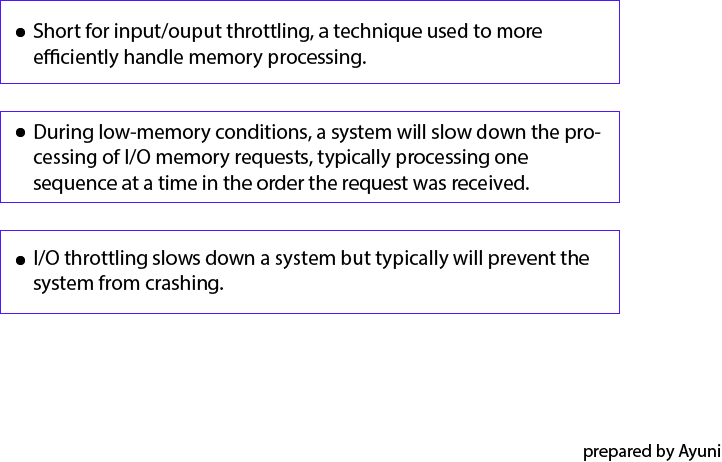
Input/Output Throttling


Source:
http://en.wikipedia.org/wiki/Peripheral
http://www.webopedia.com/


Posted by AYUNI NADIRAH BINTI ABD NASIR


Thursday, 20 November 2014

LANGUAGES OF THE COMPUTER 2 PART 1

32-bit Constants

Most constant are small.

• Using I format for arithmetic instructions with immediate operands

– Only 16 bits for immediate field

– Constants have to fit in 16 bits


• Using I format for branch address
– Only 16 bits in immediate field
– But 32 bits needed for branch address

Jump adressing
– Only 26 bits for address field
– But 32 bits needed for Jump address


Branch Addressing

  • Branch instruction specify
           - Opcode ,two registers , target address
  • Most branch targets are near branch
           - Forward or Backward


op
rs
rt
Constant or address
           
  6 bits           5 bits            5 bits         16 bits

---->     6+5+5+16=32 bits
• opcode = control instruction
• rs, rt = source operands
• address= address offset in words, ± 215
       - hardware sign-extends when uses (replicate msb)
        -target address = PC + (immed*4)


So step by step :
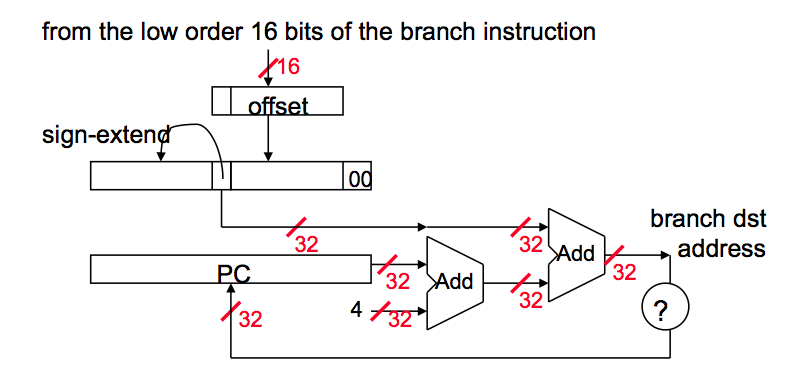
  • Sign extend the 16 bit offset value to preserve its value.
  • Multiply resulting value with 4. The reason behind this is that If we are going to branch some address, and PC is already word aligned, then the immediate value has to be word-aligned as well. However, it makes no sense to make the immediate word-aligned because we would be wasting low two bits by forcing them to be 00.
  • Now we have 32 bit address. Add this value to PC + 4 and that is your branch address.
Branch address calculation


Pc-relative addressing

PC-relative addressing: the value in the immediate 
field is interpreted as an offset of the next 
instruction (PC+4 of current instruction) 

Example: beq $0,$3,Label
sources:

Jump addressing

Language of Computer 2 part 2

EVOLUTION OF THE INTEL x86
(Backward Compatibility)

1.  8080 (1974): 8-bit microprocessor
·Accumulator, plus 3 index-register pairs
2.  8086(1978): 16-bit extension to 8080
·        Complex instruction set (CISC)
3.   8087(1980): floating-point coprocessor
·        Adds FP instructions and register stack
4.   80286(1982): 24-bit addresses, MMU
·        Segmented memory mapping and protection
5. 80386(1985): 32-bit extension (now IA-32)
·        Additional addressing modes and operations
·        Paged memory mapping as well as segments

BASIC x86 ADDRESSING MODES 

Ø  Two operands per instruction
Source/destination operand type
Second source operand
Register
Register
Register
Immediate
Register
Memory
Memory
Register
Memory
Immediate
Table above shows the arithmetic, logical, and data transfer instructions are two-operand instructions. 


There are two important differences here. The x86 arithmetic and logical instructions must have one operand act as both a source and a destination; ARM and MIPS allow separate registers for source and destination. This restriction puts more pressure on the limited registers, since one source register must be modified. The second important difference is that one of the operands can be in memory. Thus, virtually any instruction may have one operand in memory, unlike ARM and MIPS.

 Ø  Memory addressing modes
 Address in register
 Address = Rbase + displacement
 Address = Rbase + 2scale × Rindex (scale = 0, 1, 2, or 3)
 Address = Rbase + 2scale × Rindex + displacement

x86 INSTRUCTION ENCODING


a. JE EIP + displacement
             4                     4                                 8
JE
Condition
Displacement

b. CALL
              8                                                     32 
CALL
Offset

c. MOV        EBX, [EDI + 45]
           8                1         1                     8                                 8
MOV
d
w
r/m
postbyte
Displacement

d. PUSH ESI
           5                     3
PUSH
Reg

e. ADD EAX, #6765
        4              3         1                                       32
ADD
Reg
w
Immediate


f. TEST EDX, #42
        7           1            8                                                        32
TEST
w
Postbyte
Immediate

Figure above shows the instruction format for several of the example instructions. 

The opcode byte usually contains a bit saying whether the operand is 8 bits or 32 bits. For some instructions, the opcode may include the addressing mode and the register; this is true in many instructions that have the form “register = register op immediate.” Other instructions use a “postbyte” or extra opcode byte, labelled “mod, reg, r/m,” which contains the addressing mode information. This postbyte is used for many of the instructions that address memory. The base plus scaled index mode uses a second postbyte, labeled “sc, index, base.”

Ø  Variable length encoding
   ·        Postfix bytes specify addressing modes
   ·        Prefix bytes modify operation
o   Operand length, repletion, locking,..

FALLACIES

Ø                     Powerful instruction means higher performance
 §  Fewer instruction required
 §  But complex instructions are hard to implement
 o   May slow down all instruction, including simple ones
 §  Compilers are good at making fast code from simple instruction
Ø                     Use assembly code for high performance
 §  But modern compilers are better at dealing with modern processors
 §  More lines of codes means more errors and less productivity

PITFALLS 

Ø                     Sequential words are not at sequential addresses
 §  Increment by 4, not 1 !
Ø                    Keeping a pointer to an automatic variable after procedure returns
 §  E.g., passing pointer back via an argument
 §  Pointer becomes invalid when stack popped

CONCLUDING REMARKS 

 There are four design principles guide of instruction sets in making that delicate balance:
1. Simplicity favors regularity. Regularity motivates many features of the MIPS instruction set: keeping all instructions single size, always requiring three register operands in arithmetic instructions, and keeping the register fields in the same place in each instruction format.
     2. Smaller is faster. The desire of speed is the reason that MIPS has 32 registers rather than many more. 
     3. Make the common case fast. Examples of making the common MIPS case fast include PC-relative addressing for conditional branches and immediate addressing for larger constant operands.
     4. Good design demands good compromises. One MIPS example was the compromise between providing for larger addresses and constants in instructions and keeping all instructions the same length.

 Layers of software/hardware
 -- Compiler, assembler, hardware

 MIPS: typical of RISC ISAs
 -- c.f. x86

Sources:- http://www.cs.colostate.edu
                  - Lecture Note Chapter 5  

Post By: AIN NASUHA BT ABDUL YAZID